Orbit v0.2.0
npm: @restless-dreams/[email protected] · Website: orbit.hyuchia.com · Docs: orbit.hyuchia.com/docs
npm install @restless-dreams/[email protected]v0.2.0 is Orbit’s first release since it went public. It opens the maps you already have in other apps, lays maps out for paper, keeps every idea’s color where you put it, and finds room for orbits of a thousand ideas. It only adds to v0.1.0: nothing you use changes, and maps written with v0.1.0 read the same. Here’s everything that changed and how to use it.
💜 Support Orbit#
Orbit is free and open source, with no ads and nothing locked away. If it’s useful to you, you can help it grow: your support pays for the time that goes into new features and fixes.
- ❤️ GitHub Sponsors
- 💸 Wise
- 🧡 Patreon
- ☕ Ko-fi
📰 Release Change Log#
🌟 New Features#
📥 Maps From Other Apps
importMap turns a file from another app into Orbit maps: OPML, which outliners and most mind map apps write, FreeMind and Freeplane’s .mm files, and XMind workbooks, from XMind 8 to today’s. Notes, links, links between ideas, folded branches and a workbook’s pictures come with them. Each XMind sheet becomes a map of its own, and the warnings say what the other app had that Orbit keeps another way, or couldn’t keep.
import { importMap, serializeOrbitMarkdown } from '@restless-dreams/orbit';

const bytes = new Uint8Array(await file.arrayBuffer());
const { format, maps } = importMap(bytes, { name: file.name });

for (const map of maps) {
  const markdown = serializeOrbitMarkdown(map.document);
  // map.media holds the workbook's pictures, by the path the map gives them.
  // map.warnings says what came over another way.
}
A file Orbit can’t read throws an OrbitImportError whose code says why: unknown-format, unreadable, empty, password-protected or too-large. detectImportFormat(bytes, name) tells the format without reading the map, and importOPML, importFreeMind and importXMind read one format each.
📤 OPML Out
exportOPML writes a map as OPML 2.0, so a map moves out as easily as it came in. Notes, links, statuses (as checkboxes outliners understand) and tags go with it, and a map Orbit writes reads back the same.
import { exportOPML } from '@restless-dreams/orbit';

const opml = exportOPML(markdown, { title: 'Launch plan' });
⌨️ orbit convert
The command line does both, with a workbook’s pictures written next to the map:
npx @restless-dreams/orbit convert --to md Garden.xmind --out garden.md   # every sheet, its pictures in media/
npx @restless-dreams/orbit convert --to md outline.opml > outline.md
npx @restless-dreams/orbit convert --to opml my-map.md --out my-map.opml
Everything about bringing maps in, what comes over from each app and every warning, is in Maps from other apps.
🖨️ Printing
A map’s web page now prints laid out for paper, so the browser’s Print or Save as PDF gives a document to email, hand in or print: the title, the map as a picture the width of the page, then every idea in reading order with its status, tags, link, note, picture and video. An idea never breaks across pages, and a heading stays with what follows it.
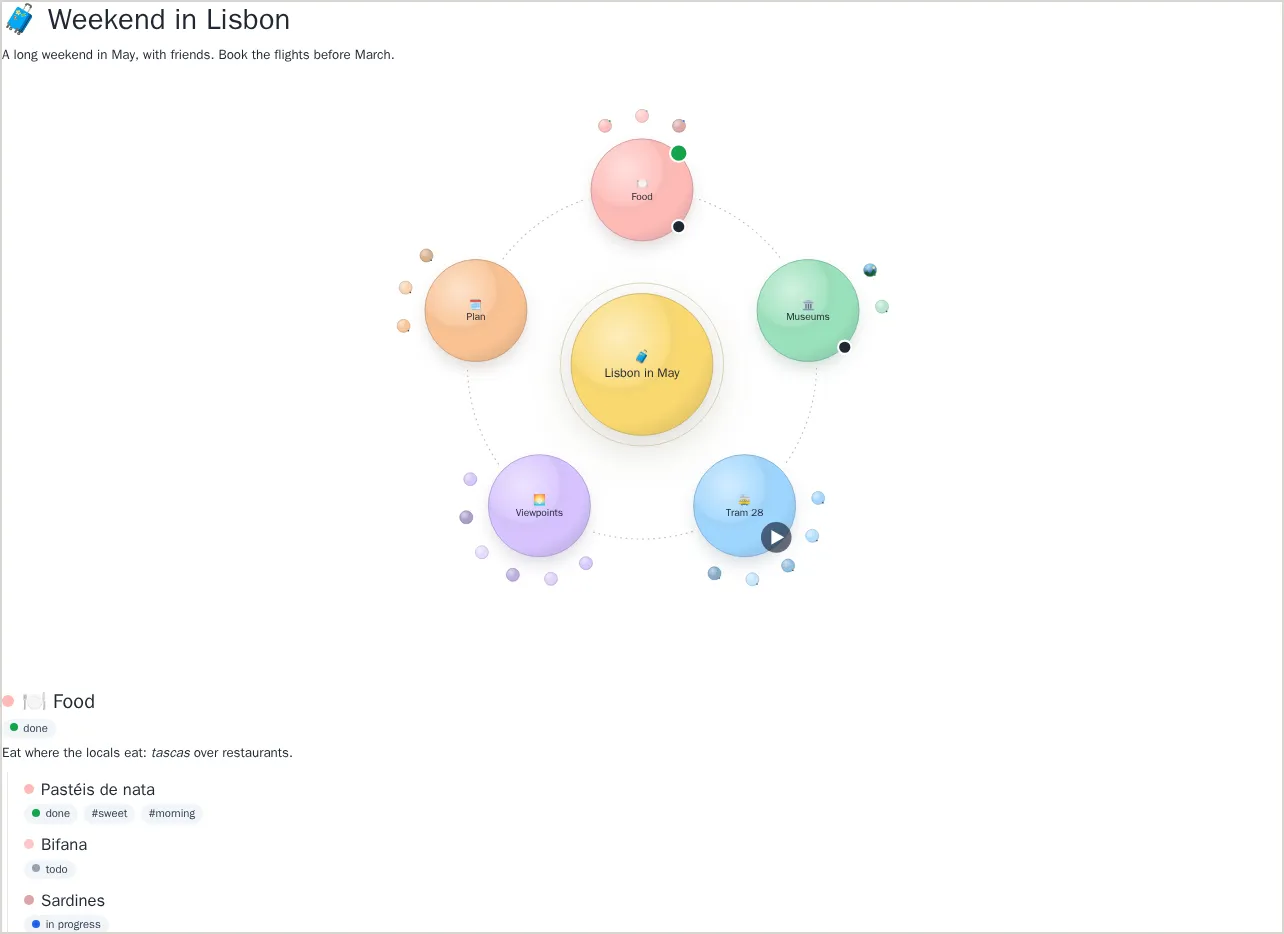
renderPrintLayout lays a map out the same way in any page. It fills an element you show only in print:
import { renderPrintLayout } from '@restless-dreams/orbit';

renderPrintLayout(document.querySelector('#print'), markdown, { viewMode: 'all' });
#print { display: none; }
@media print {
#app { display: none; }
#print { display: block; }
}Paper is light, so dark themes print in their light counterparts: night and cosmos as paper, glass-night as glass, blueprint as ink. printTheme(theme) says which, and PRINT_THEMES lists them all. To make a PDF without anyone printing, use a headless browser: chromium --headless --no-pdf-header-footer --print-to-pdf=map.pdf map.html, or Playwright’s page.pdf(). See the Guide and Printing.
🎨 Colors That Stay With Their Ideas
Top-level ideas used to take the palette’s colors by their place in the orbit, so deleting or moving one gave every idea after it a new color. People find their way around a map by color, so now a color stays with its idea.
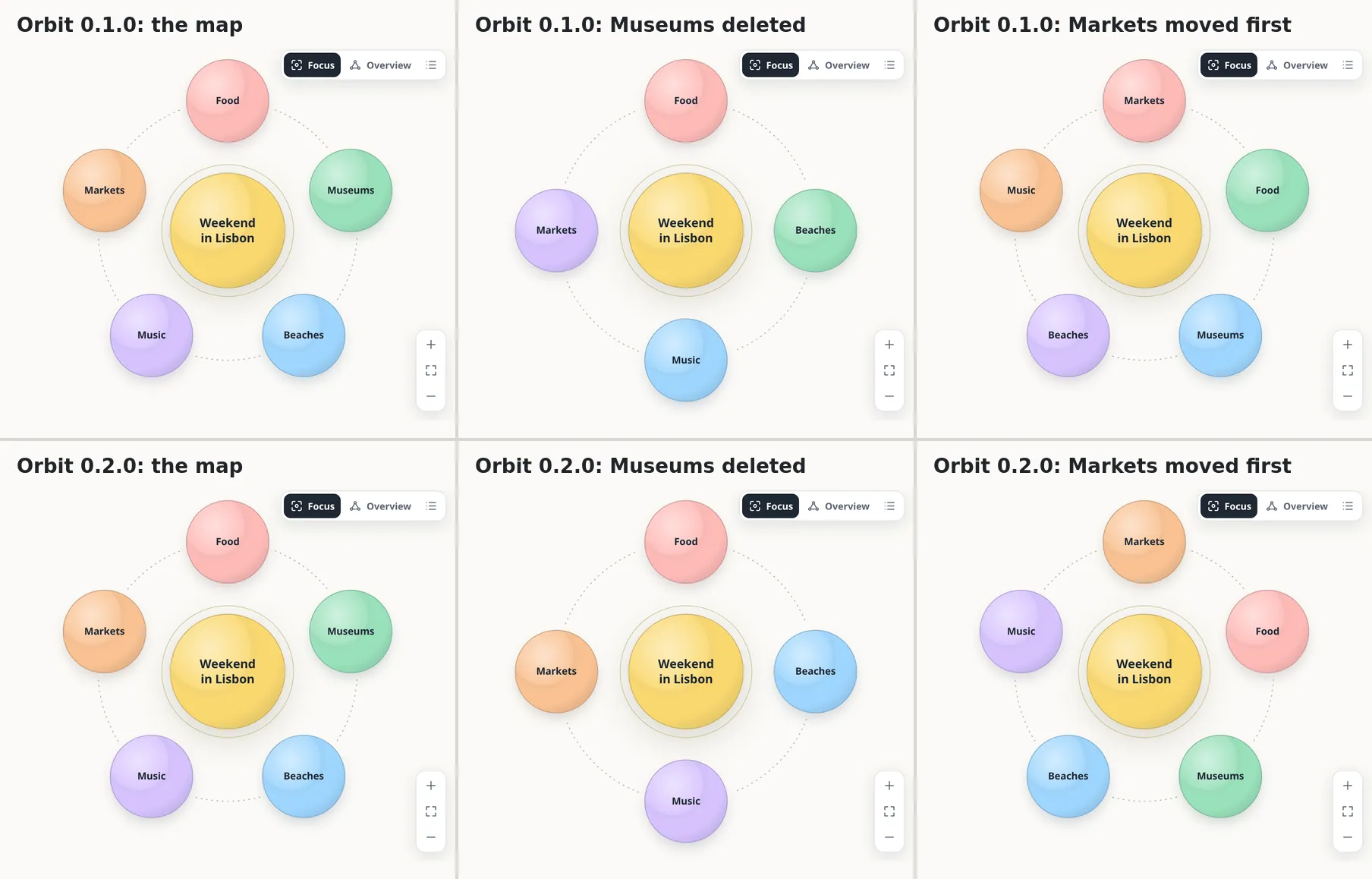
The new paletteColor attribute gives an idea one of the palette’s colors by number, so it still follows the theme and the map’s palette:
## Research <!-- orbit paletteColor: 3 -->You’ll rarely write it yourself: addNode, updateNode, removeNode and moveNode, and the map tools, write it where a color would change otherwise, as rarely as they can. A moved idea keeps its color, a new one takes a color no other top-level idea has, and an idea moved under another takes its new branch’s shade. See Colors.
🪐 Orbits of Any Size
An orbit used to stop adding rings at seven and put every planet that didn’t fit on the last one, so a pasted list of a thousand lines came out as specks under a pixel across. Now rings go on until every planet has a place, and the planets are big enough to read when you zoom in.
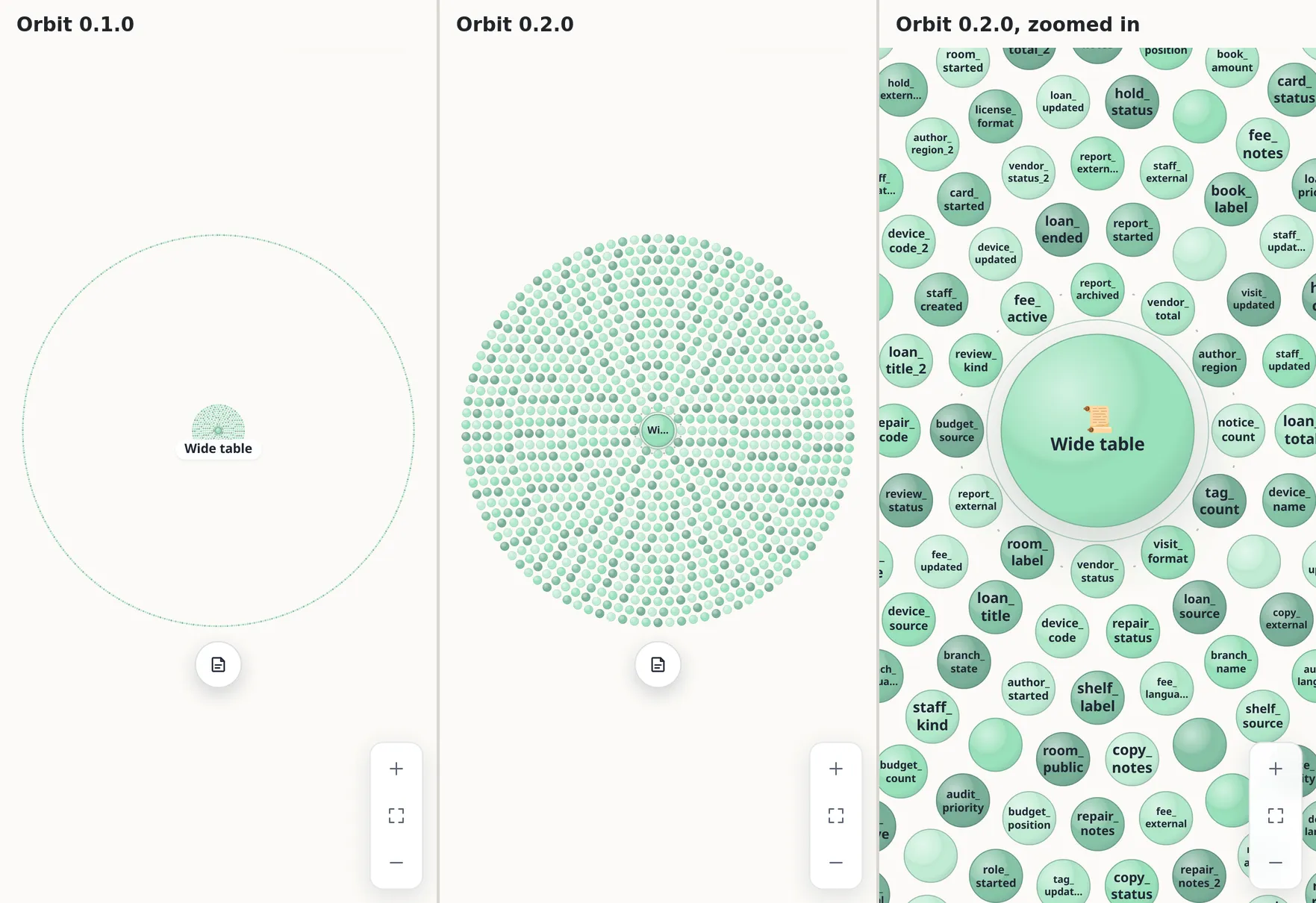
Spinning one stays smooth: an orbit of 1,000 planets meets Orbit’s goal of 60 frames a second in its benchmark (bun run bench -- --map=huge --profile=phone), on a phone-sized screen with the processor slowed four times.
⚡ Improvements#
- Crowded orbits under the pointer: their planets no longer grow as the pointer passes, so dragging one round passes over hundreds of planets without animating each of them.
- Flights into crowded orbits: the planets that come or go with their siblings show their names once the flight lands, instead of placing them on every frame.
- Gestures: a gesture asks where the map is on the page once, when it starts, instead of on every move, which made the browser lay out the whole map.
📦 Misc#
- Every release’s maps, tested:
tests/fixtures/releases/keeps the maps each release wrote, and every build has to read them, write them back exactly, and keep what they say through format upgrades. - The renderer, in parts: rings and links, names, nodes and node types’ contents are drawn by classes of their own. Nothing changes for you; it makes the next changes easier.
- Docs: Maps from other apps is new, printing is in the Guide and Theming, and Map tools for AI, there since
v0.1.0, is on the website now too.
How To Upgrade#
If you’re on v0.1.x#
npm install @restless-dreams/[email protected]That’s it: everything v0.1.0 had is still there. One thing to know if several versions read the same maps: maps edited with v0.2.0 may gain paletteColor attributes. v0.1.0 keeps them as they are, writes them back, and colors those maps by place, as it always did.
Orbit for Android v0.3.0 uses this release.