Orbit v0.4.0
October 31, 2026
Hyuchia
npm: @restless-dreams/[email protected] · Website: orbit.hyuchia.com · Docs: orbit.hyuchia.com/docs
npm install @restless-dreams/[email protected]v0.4.0 gives ideas sounds and live photos, lets a page keep ideas out of sight until it reveals them, and takes text and files dropped onto a map. Long words now break where English and Spanish break them, and the names of options, types and functions are settled for 1.0. It covers everything since v0.2.0: 0.3.0 was made but never published. It takes nothing away: the old names keep working until 1.0, and maps written with v0.2.0 read the same. Here’s everything that changed and how to use it.
💜 Support Orbit#
Orbit is free and open source, with no ads and nothing locked away. If it’s useful to you, you can help it grow: your support pays for the time that goes into new features and fixes.
- ❤️ GitHub Sponsors
- 💸 Wise
- 🧡 Patreon
- ☕ Ko-fi
📰 Release Change Log#
🌟 New Features#
🔊 Sounds On Ideas
An idea can hold a sound now: a voice memo, music or a recording. It’s written as the idea’s audio attribute, with its caption in its own value:
# Trip
- Kickoff <!-- orbit audio: memos/kickoff.m4a -->
- Interview
  <!-- orbit
  audio:
    src: https://example.com/interview.mp3
    caption: The first interview
  -->
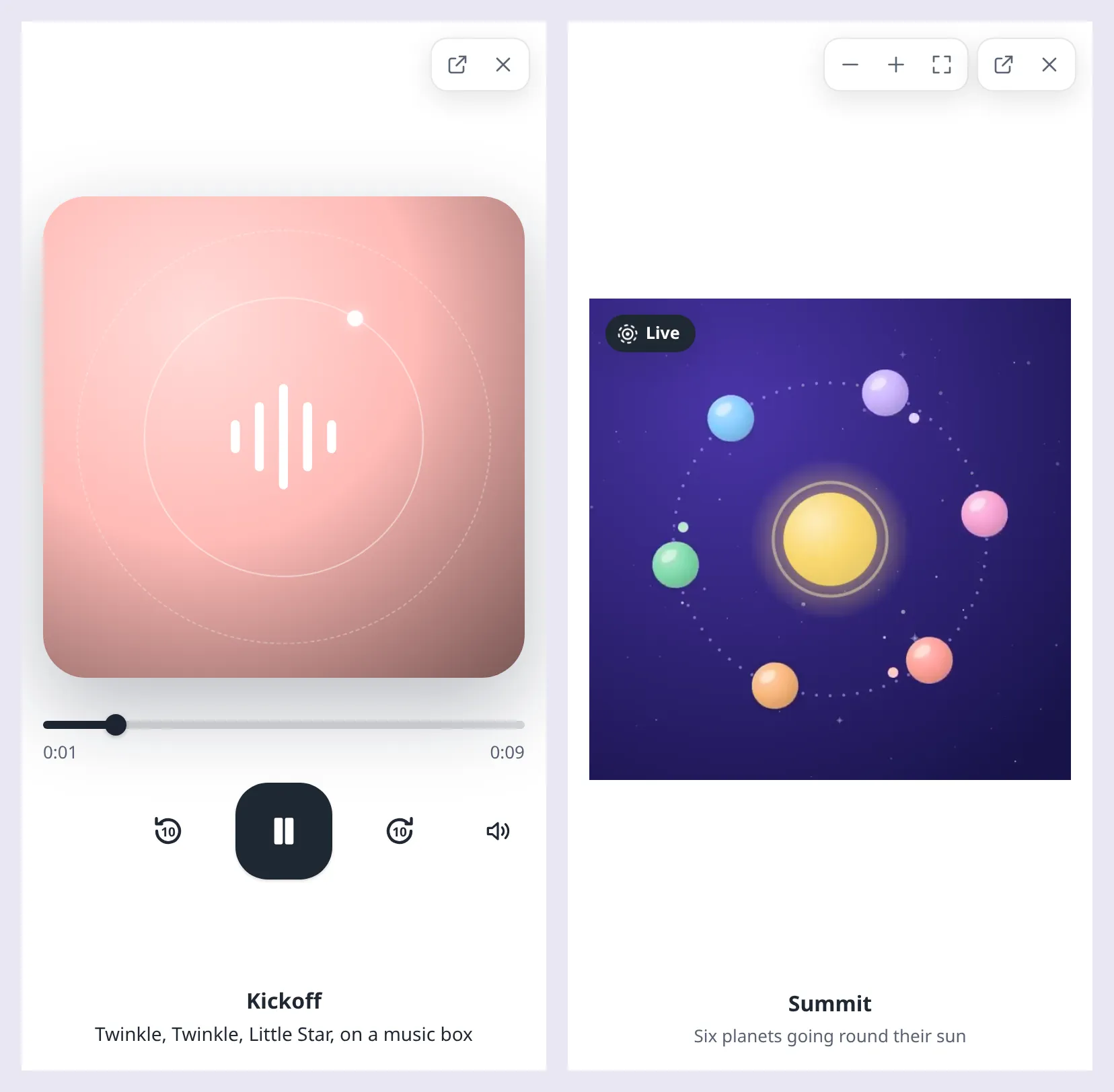
Its planet wears a small sound wave, and “Play sound” opens it in the media viewer, in Orbit’s own player. The player looks the same in every browser and takes the map’s theme: where the sound is, to drag, ten seconds back and on, and its sound off and on, under the idea’s picture, or art made of its color and icon whose rings turn while it plays. The detail sheet plays it right there, on one line. Any file the browser plays works (.mp3, .m4a, .aac, .ogg, .opus, .wav, .flac), and on the keyboard Space or K plays and pauses, J and L go ten seconds back and on, and M turns the sound off and on. A page can play one from code too:
map.openMedia('kickoff', { kind: 'audio' }); // the viewer opens on its sound, playingplayMedia(), pauseMedia(), seekMedia() and unmuteMedia() drive it as they drive a video, and media-open says kind: 'audio'. exportWebPage puts a sound inside the page when media gives it as data:audio/mp4;base64,…. A sound has no line of its own, only the attribute, so versions before 0.4.0 read these maps exactly as they did: they keep audio, write it back as it was, and play nothing. See Pictures, videos and sounds.
📸 Live Photos
A picture can carry its motion now, the few seconds of video a phone records around it. The map and the detail sheet show the picture still, and the media viewer plays the motion over it: once as it shows it, muted, and again, with its sound, while the picture, its “Live” mark or the space bar is held.
# Trip
- Summit
  <!-- orbit
  image:
    src: media/summit.jpg
    motion: media/summit-motion.mp4
  -->
- Lake
  <!-- orbit
  image:
    src: media/lake.jpg
    motion:
      src: media/lake-motion.mp4
      still: 1.5
    alt: Mist on the lake at dawn
  -->
still says where in the motion the picture was taken, in seconds, when the phone said so: the motion then ends on the picture itself, so nothing jumps as it settles. With reduced motion, it plays only when asked. From code, playMedia() plays the motion through once with its sound, pauseMedia() settles it back on its picture, and media-state follows it with kind: 'image':
map.on('media-state', ({ node, kind, playing }) => {
  if (kind === 'image') {
    console.log(`${node.text}'s live photo is ${playing ? 'playing' : 'still'}`);
  }
});
The motion’s video loads only when it’s needed, and one that can’t be played leaves the picture as it is. A page made with exportWebPage carries the motion inside it with the picture, and orbit export --html does for a motion on your computer. Versions before 0.4.0 show the still, and write motion back as it was. See Live photos.
🙈 Ideas To Reveal Later
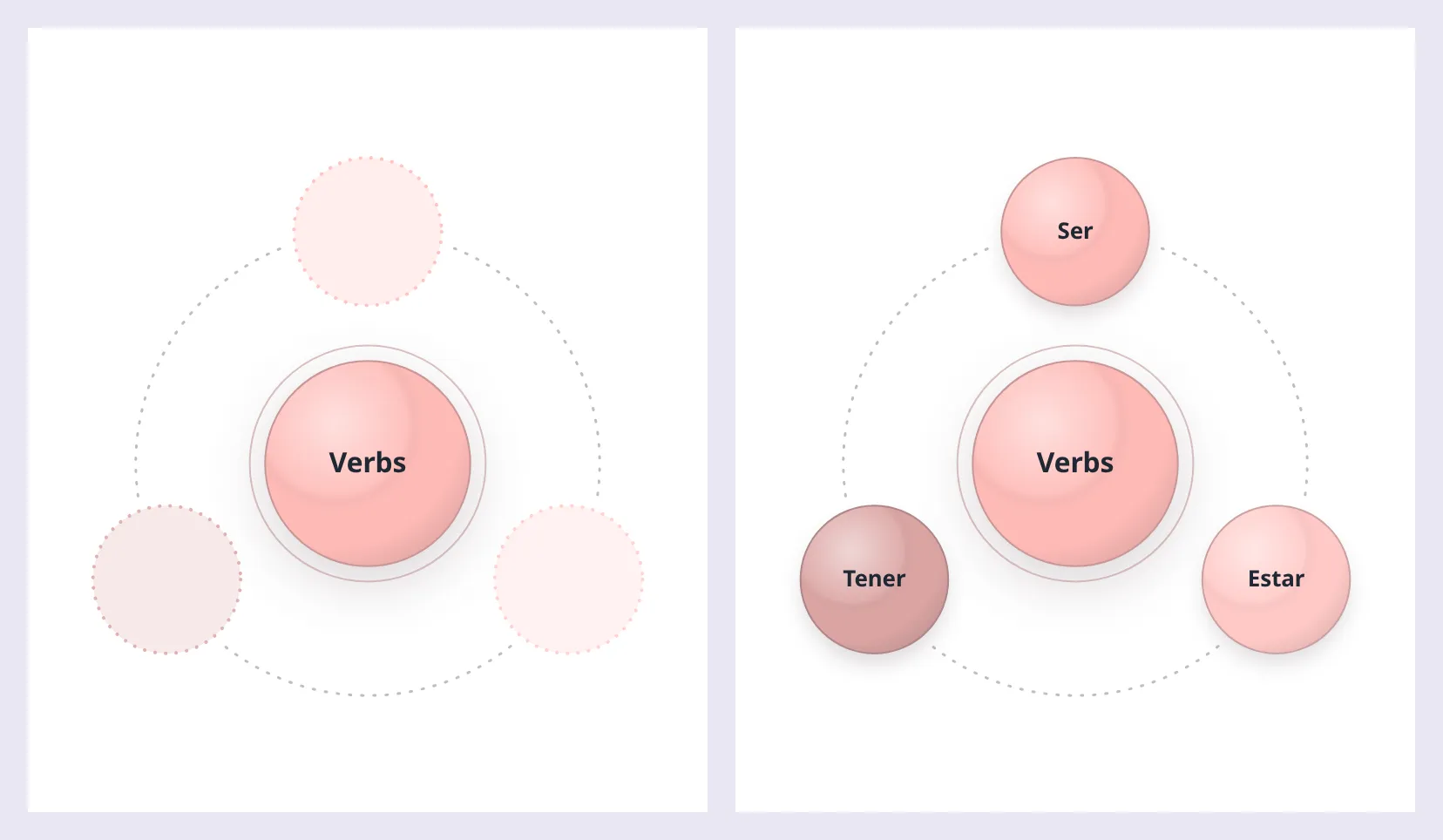
hideChildren(ids) keeps the ideas under nodes out of sight, and revealChildren(ids?) grows them into place: the cards of a quiz, where you recall what’s under an idea before you see it, or a talk that keeps each step’s ideas for when it gets there.
import { createOrbitMap } from '@restless-dreams/orbit';

const map = createOrbitMap(element, markdown);
map.hideChildren(['verbs', 'nouns']);
map.flyTo('verbs');
// …and when the reader is ready:
map.revealChildren('verbs');
A node in focus keeps a faint place in its orbit for each hidden idea, in that idea’s color and where it will land, so the reader knows how many are coming, and revealing them grows each one out of the node to its place. Anywhere else, a node with hidden ideas shows as if folded, with a “+N”. Screen readers hear how many are hidden (“Nouns, 2 hidden ideas”), then the names of the ideas as they show. Both methods return whether anything changed, and <orbit-map> and the React wrapper’s ref have them too. Orbit for Android’s new study mode is built on them.
Hiding is only how the map looks: toMarkdown(), the map’s events, prints and map tools still read every idea, so don’t hand a quiz’s map to a model that shouldn’t see its answers. See Hiding ideas to reveal later.
📥 Drops From Elsewhere
Text, links and files dragged onto a map, from another app or another part of the page, can go into the idea they’re let go over. getNodeAt(x, y) finds the idea drawn at a point, and setDropTarget(id) lights it up, as a node dragged on the map lights its target. What a drop adds is up to you:
element.addEventListener('dragover', (event) => {
  event.preventDefault();
  map.setDropTarget(map.getNodeAt(event.clientX, event.clientY)?.id ?? null);
});

element.addEventListener('dragleave', (event) => {
  if (!element.contains(event.relatedTarget as Node | null)) {
    map.setDropTarget(null);
  }
});

element.addEventListener('drop', (event) => {
  event.preventDefault();
  map.setDropTarget(null);
  // Let go where there's no idea, it goes into the one in focus.
  const node = map.getNodeAt(event.clientX, event.clientY) ?? map.getFocusedNode();
  const text = event.dataTransfer?.getData('text/plain').trim();

  if (node && text) {
    map.addNode(node.id, { text });
  }
});
A node catches a drop a little past its edge, so small moons can be hit, and both methods work whether or not the map is editable. See Drops from elsewhere.
✂️ Long Words That Break Where They Should
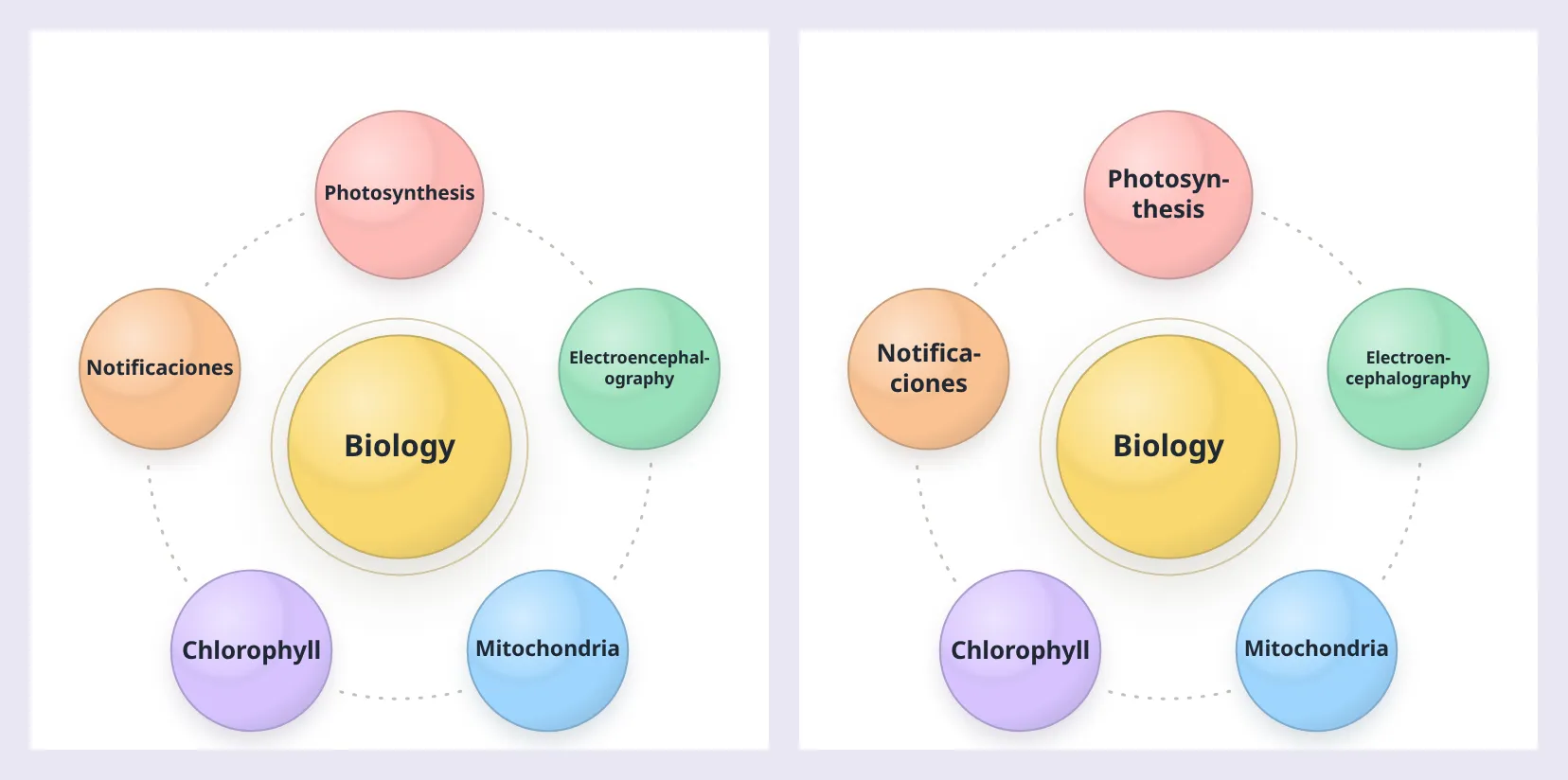
A name too long for its planet used to shrink, or break wherever its line ran out. Now a long word breaks with a hyphen where the map’s language breaks it, from the hyphenation patterns TeX uses, in English and Spanish: “Pho-to-syn-the-sis”, “No-ti-fi-ca-cio-nes”. When the name then fits, it breaks where its lines come out even: “Electroen- / cephalography”, not “Electroencephalogra- / phy”. And a word breaks rather than shrink its whole name, when that shows the name at least 2 px larger.
- Names on pills: a planet whose name has no room inside it shows the name on a pill under it, with its icon, instead of none.
- Statuses in the map’s language: the four a file writes for a task’s state,
todo,active,doneandblocked, are said and shown in the map’s language: “En curso” forstatus: activein Spanish. Any other word shows as written.
registerHyphenation adds another language’s patterns, such as hyph-utf8’s:
import { registerHyphenation } from '@restless-dreams/orbit';

// germanPatterns and germanExceptions: hyph-utf8's hyph-de-1996.pat.txt and .hyp.txt, as text
registerHyphenation('de', germanPatterns, { exceptions: germanExceptions, left: 2, right: 2 });
Without patterns for its language, a map breaks a long word wherever its line ends, at least three letters from either end. See Where long words break.
🪟 A View That Glides Out Of The Way
insets tells Orbit what your page’s own controls cover, so its views fit into what’s left. When that room changes once, say a panel opening, insetsTransition: 'glide' moves the map’s view into it with the camera, instead of at once:
map.setOptions({ insets: { right: 360 }, insetsTransition: 'glide' }); // a panel opened on the rightIt holds for that setOptions call alone. The default, 'instant', keeps a fitted view within its room at once, as it must while a keyboard slides or a sheet is dragged and the insets change every frame. <OrbitMindMap> takes it as a prop. See Renderer options.
🎨 A Node’s Color For Your CSS
Each node’s element carries the color its planet is drawn with, as --orbit-node-color, beside its id, as data-orbit-node-id. A page can draw with it, or pick text that reads on the planet:
.orbit-node[data-orbit-status='blocked'] .orbit-node__shade {
  stroke: var(--orbit-node-color);
  stroke-width: 4;
}
The color is a CSS color, or a color-mix() of one for an idea that takes a shade of its branch’s. See Styling nodes with CSS.
🔁 Changes#
🏷️ Names Settled For 1.0
A few names change, so that options are named as a document writes them and types take Orbit’s name: RendererOptions is OrbitRendererOptions now, for example. The old names keep working until 1.0: their types are marked @deprecated, so editors strike them through, and an old option, attribute or function says so once on the console the first time a page uses it.
import { createOrbitMap } from '@restless-dreams/orbit';

// v0.2.0
createOrbitMap(element, markdown, { viewMode: 'all', orbitAnimation: true, orbitSpeed: 60, mediaViewer: false });

// v0.4.0
createOrbitMap(element, markdown, { view: 'all', animation: true, speed: 60, showMediaViewer: false });viewMode,orbitAnimationandorbitSpeed→view,animationandspeed, andviewMode→viewinrenderToSVGString,renderPrintLayoutandexportWebPagetoomediaViewer→showMediaViewer<orbit-map view-mode="…">anddata-view-mode→view="…"anddata-viewrenderOrbitMarkdownBlocks()→hydrateOrbitBlocks(), from the package’s root as from/markedisOrbitThemePreset()→isThemePreset()spin-settle’splanet→nodeRendererOptions→OrbitRendererOptions,ViewMode→OrbitViewMode,ParsedOrbitDocument→OrbitParsedDocument,RenderToSVGOptions→OrbitSVGOptions,MapTools→OrbitMapTools, and more types
Every rename is in Compatibility, a new page that says what’s public and how a name changes.
📞 Callbacks And Events That Agree
import { createOrbitMap } from '@restless-dreams/orbit';

const map = createOrbitMap(element, markdown, {
  onFocusChange: (node, path) => console.log(path.map((step) => step.text).join(' › ')),
});

map.on('spin-settle', ({ node }) => console.log(`${node.text} is on top`)); // was { planet }onFocusChangegets the path from the root as well as the node, as thefocus-changeevent has them.spin-settlenames its nodenode, as every other event does.planetkeeps working until 1.0.- A callback that throws no longer stops the map: the error is reported, and the event still reaches the
on()listeners and the DOM.
✏️ addNode And updateNode Read Values As A File’s Are
The format’s shorthands work in code now, such as a picture given as its address, or tags as one string:
map.addNode('trip', { text: 'Summit', image: 'photos/summit.jpg', tags: 'hike, views' });
map.updateNode('summit', { image: { src: 'photos/summit.jpg', motion: 'photos/summit-motion.mp4' } });
A value Orbit can’t read, such as a picture without an address, throws a TypeError that says what it takes, and the map stays as it was. The fields of a picture, video, sound or embed that Orbit doesn’t use, a live photo’s motion among them, are kept through edits, also when a new value for the same file changes only its caption. See The editing methods.
🗂️ Maps That Say Their Version
When the format next changes, every map Orbit writes will say which version it’s written for, so it never reads back as an older one. A map written for a newer format than this version reads isn’t edited on the map, even when it’s editable, and a console warning says why. Its editing methods still work, for a page that knows what it’s changing, but refuse an edit that would replace what this version can’t read. getDocument() now has the problems Orbit found reading the map, so your own UI can show it read-only too:
const writtenForNewer = map.getDocument()?.diagnostics?.some((problem) => problem.code === 'unsupported-schema-version');A YAML map written for a newer format is written back as it was too, and an edit writes again only what it changes. See Versions.
⌨️ The Command Line Never Writes A Broken Map
orbit render, export and convert go on after warnings, but a map with an error, one Orbit couldn’t read past or one written for a newer format, is never written: they exit with 1 and write nothing, so convert --out map.yaml map.yaml can’t put an empty map where yours was. v0.2.0 wrote it and exited with 0.
$ npx @restless-dreams/orbit convert --to yaml plans.md --out plans.yaml
plans.md:2: error: This map is written for version 2 of the format, and this version of Orbit reads up to 1. Everything in it is kept, but open it with a newer Orbit to change it. [unsupported-schema-version]
orbit convert: plans.md has errors (above), so nothing was written: fix them first (orbit validate lists them)
⚡ Improvements#
- SVGs that share a page: without an
idPrefix,renderToSVGStringand a map’stoSVGString()make their ids from the drawing, so SVGs of different maps can sit on one page, and the same drawing always gets the same ids. - Exports with sounds:
exportWebPageandorbit export --htmlput sounds and live photos’ motions inside the page, and printing lists each sound by its caption, with its address when it’s on the web. - Typing on a phone: a + too small to type in, as a phone’s map gets over its keyboard, gets a field floating over it at a size you can read.
- Screen readers: a map whose
languageoption names a language says so with alangattribute, so its words are read in it on a page in another, and a map shared as a web page moves focus to the idea it presents. - Links in code: link-like text in code or an HTML comment in a note isn’t a link, as the note doesn’t show it as one.
- Material from a name:
materialThemetakes CSS color names too, such astomato. - Plainer words: Orbit’s English says “idea” and “picture” where it said “node” and “image” (“View picture”, “Back to the idea above”), and “web page” for an embed.
- Node types: a type’s
renderelement carriesdata-orbit-smallwhile its node is drawn under 36 px across, for CSS to leave out words too small to read there, and nodes written for a newer version of their type are drawn as plain ideas.
🔒 Safer#
- Addresses joined to a base are checked again: joined to a
baseUrlthat isn’thttp,httpsorfile, such asjavascript:, a relative address stays relative instead of taking the base’s scheme. A document’s ownbaseUrlthat isn’t a web address or a relative path is reported and ignored. - YAML aliases repeat at most 100,000 values, so a few lines of aliases of aliases can’t fill the memory.
- HTML notes from other apps are read in a time that grows with the note: one full of
<script>or<style>elements took a time that grew with its square. - A web page’s style keeps a theme’s values in their place:
exportWebPagewrites a theme’s colors into the page’s style only when they’re plain colors or shadows, and escapes<there, so no value can end its declaration or the style element.
📦 Misc#
- Compatibility is new: what’s public (the options, methods and events, the
--orbit-*custom properties,--orbit-node-colorincluded, the command line and the codes), how a change is announced, and every name that changed. Tests hold the public surface to what’s documented. - Chromium 99, tested: Orbit draws in browsers down to Chromium 99, which some phones’ WebViews still run, and every change is now checked in Chromium 99 itself.
- The guide covers every option, event, method and callback, and a test keeps it that way. “Pictures and videos” is now Pictures, videos and sounds.
- Hyphenation patterns: Orbit includes hyph-utf8’s American English and Spanish patterns, with their notices in the README and in
src/core/hyphenation/. - Contributors:
bun run testgives each test a minute, so a busy machine doesn’t fail the suite, andbun run verifydraws maps in Chromium 99 too.
How To Upgrade#
If you’re on v0.2.x#
npm install @restless-dreams/[email protected]Everything v0.2.0 had still works. Before 1.0:
- Move to the new names. Your editor strikes the old ones through, and the console says once which ones a page still uses. Compatibility lists them all.
- Read
nodefromspin-settle, notplanet.
Two things may change what you see now:
- Scripts that run
orbit render,exportorconverton a map with an error get exit code 1 and no output for it. - Tests that look for Orbit’s English words find the new ones: “View picture” where it said “View image”, for example.
If several versions read the same maps: maps v0.2.0 wrote open in v0.4.0 as they did. v0.2.0 opens what v0.4.0 writes and keeps what it doesn’t know as it was, sounds and live photos’ motions included: it plays no sound, and shows a live photo’s still. One caveat: in v0.2.0, changing a live photo’s picture value itself, such as a new caption through updateNode, drops its motion, where v0.4.0 keeps it.
Orbit for Android v0.4.0 uses this release.