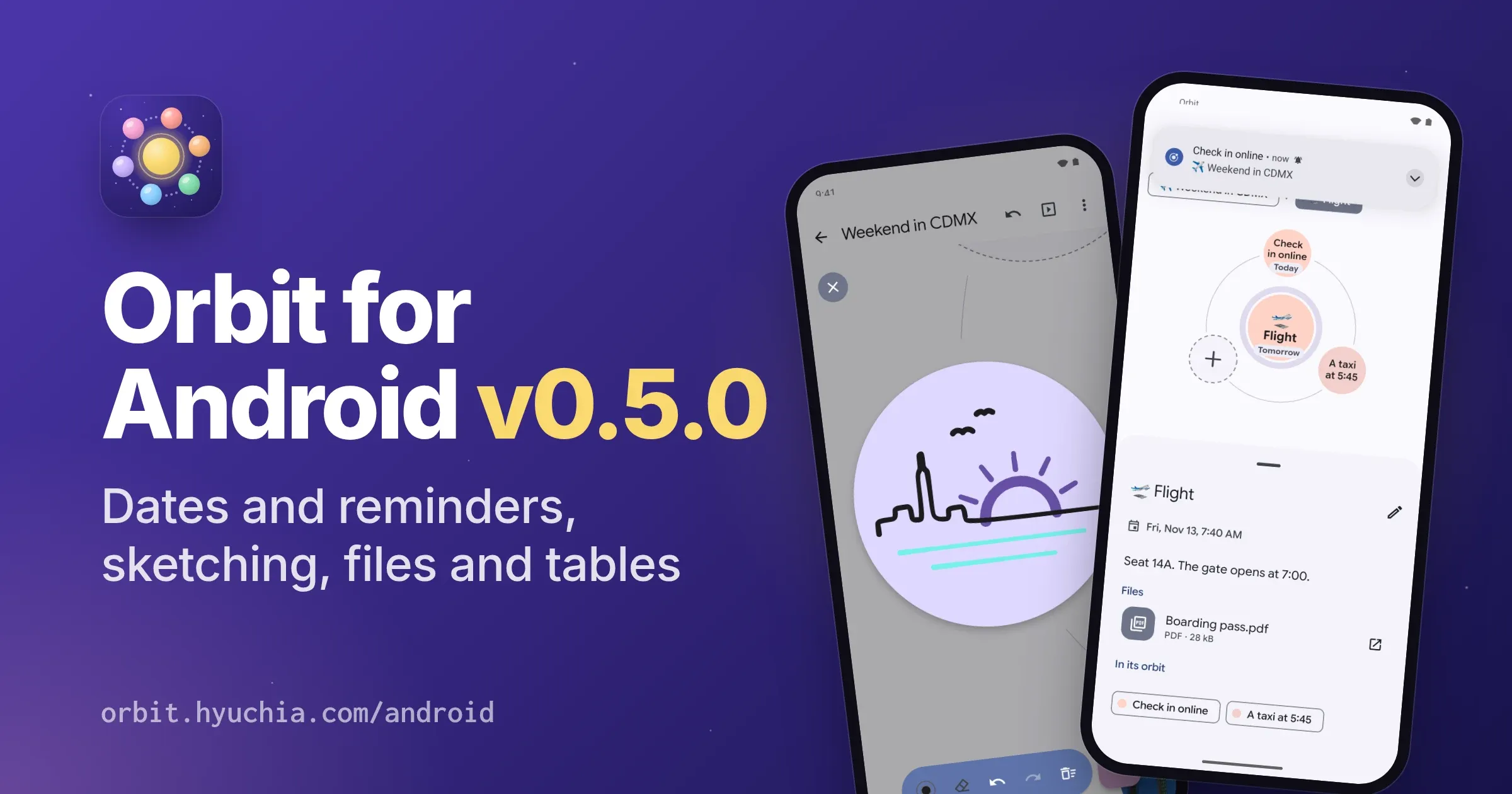
Orbit for Android v0.5.0
November 9, 2026
Download Link: orbit-0.5.0.apk · Google Play: Get it on Google Play · More: orbit.hyuchia.com/android
v0.5.0 gives ideas dates, and reminds you when they come. Notes show tables, and checklists you tick right in the note. You can sketch right on a planet with your finger or a stylus, and attach a PDF, a spreadsheet or any other file to an idea. Maps hold up to 1 GB now, and a big video can be made smaller as it comes in. Orbit speaks Brazilian Portuguese, and more than a hundred fixes from a review of the whole app make saving, syncing, sharing and private maps sturdier. It installs over v0.4.0 and keeps your maps, and it needs Android 10 or later. Orbit is still free, with no account, no ads and no tracking. Here’s what’s new and how to use it.
💜 Support Orbit#
Orbit is free and open source, with no ads and nothing locked away. If it’s useful to you, you can help it grow: your support pays for the time that goes into new features and fixes.
- ❤️ GitHub Sponsors
- 💸 Wise
- 🧡 Patreon
- ☕ Ko-fi
📰 Release Change Log#
🌟 New Features#
📅 Dates And Reminders
Give an idea a date, and a time if you like, and Orbit reminds you when it comes. Long-press the idea and pick Add a date, or open its editor: Material’s date and time pickers come up, and under the date the editor says when Orbit will remind you (“Orbit reminds you at 9:00 AM that day”), or why it won’t.
The date shows small inside the planet: “Today”, or its time today, “Tomorrow”, “Fri”, “Nov 20”, in the app’s language and on the phone’s 12- or 24-hour clock. Once it’s past it turns red, unless the idea is done. The idea’s details show it after a calendar (“Overdue: Mon, Nov 16” once it’s past), the outline shows each date after its idea, and TalkBack says it with the idea’s name, and whether it’s overdue.
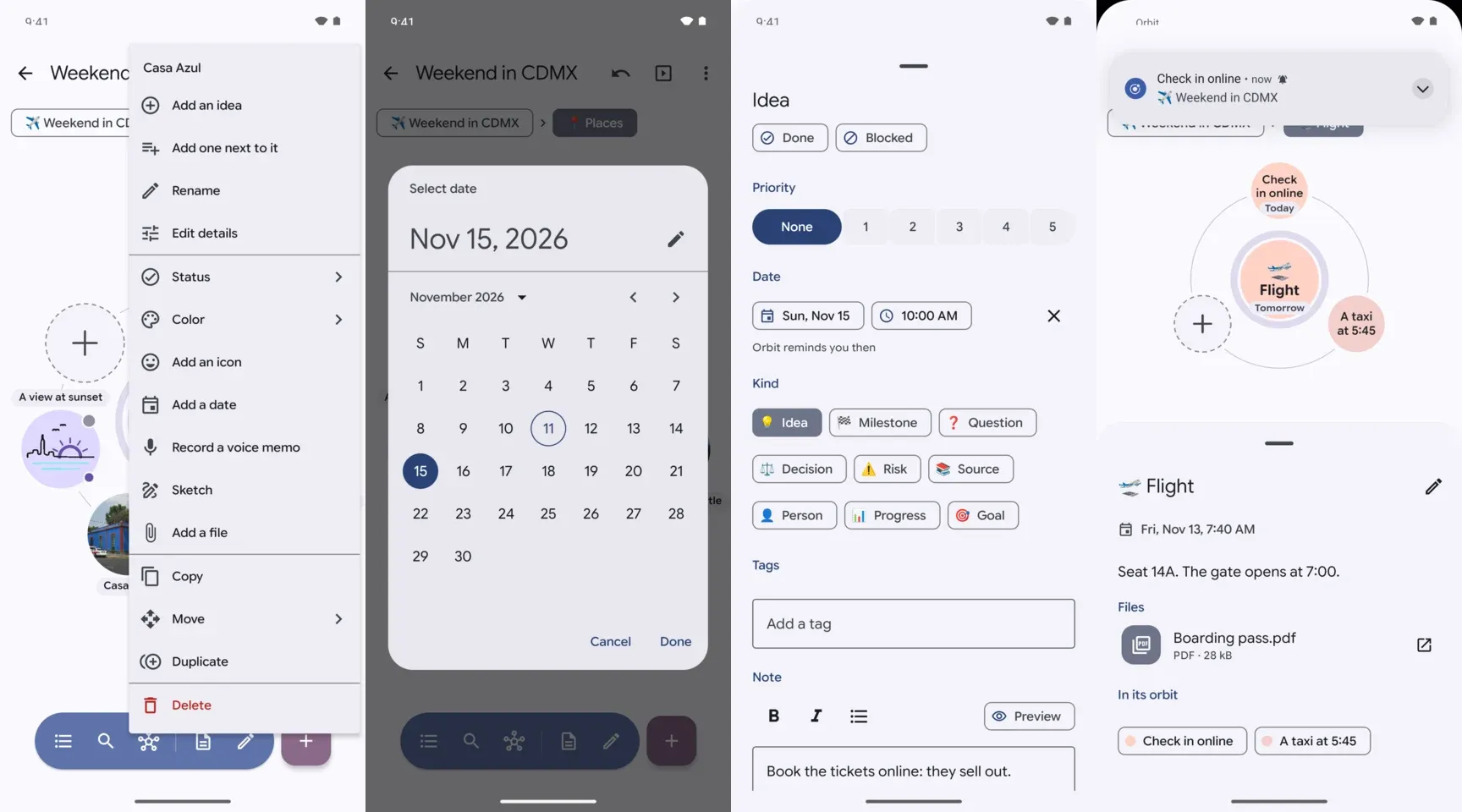
When the date comes, at its time, or at 9:00 for a date alone, a notification reminds you on every device that has the map, as a calendar does, and a tap opens the map at the idea. It comes within minutes of its time, and a reminder missed while the phone was off comes as it starts again. Reminders follow a date wherever it changes: on the map, in the folder you keep maps in, sent from another device, imported or restored from a version. Ideas you’ve marked done don’t remind you, and neither do maps in the trash.
A private map’s reminder only says “A reminder from a private map”, wherever it shows, the lock screen included, and its tap asks for your screen lock before the map opens. On Android 13 and later, Orbit asks to post notifications once, as you set your first date, saying why, and Settings can turn reminders off on this device. A date is part of the map’s file, as due: "2026-11-20 09:30", in local time: 9:30 is 9:30 wherever you are.
📝 Tables And Checklists In Notes
Notes show tables now, as Material tables: a tonal header row, a line between rows, and each column aligned as you wrote it. A table wider than the details scrolls sideways inside them. Checklists have Material checkboxes, and a checked item is dimmed and struck through.
To check one off, tap anywhere on its item, right in the idea’s details: only that line of the map’s file changes, and a message says so, with Undo. To write them, use markdown in the note, in the editor: a table is a header row, then a row of dashes, and a checklist is items that start with - [ ], or - [x] for one that’s done.
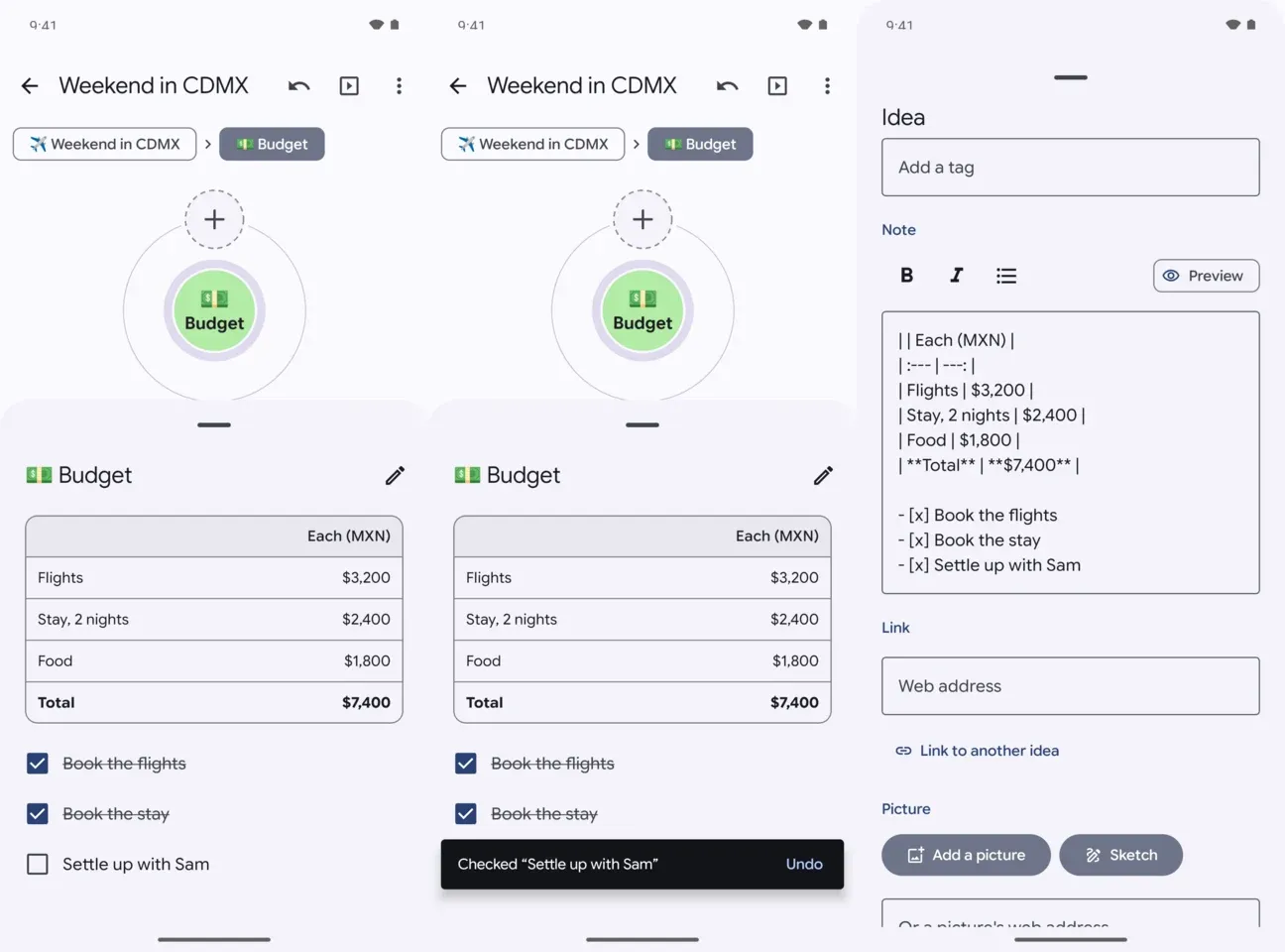
TalkBack hears a table as a table, with its header cells as headings, and each item as one checkbox named by its words. Tables and checklists show as they do in the details wherever a note goes: presenting, on the audience’s screens too, study sessions, web pages, PDFs and prints. Nothing checks while you present or study.
✏️ Sketching On A Planet
Draw right on a planet. Pick Sketch in an idea’s long-press menu or its editor, and its planet turns into a canvas, right where it is: the map flies until the planet fills most of the screen, the rest of the map dims, and the planet becomes round paper in its own color.
Draw with your finger or a stylus. A stylus draws thinner or wider as you press, and wider laid flat, and while it’s near the screen, a palm resting on it draws nothing. The toolbar under the planet has the pen, whose second tap offers the map’s own colors, black and white, and three widths; the eraser, which takes the strokes it passes over (so does a stylus’s other end, or its button held); undo and redo; clear; and Done. On a keyboard, P and E pick the pen and the eraser, Ctrl+Z and Ctrl+Shift+Z undo and redo, Ctrl+Enter is Done and Escape leaves.
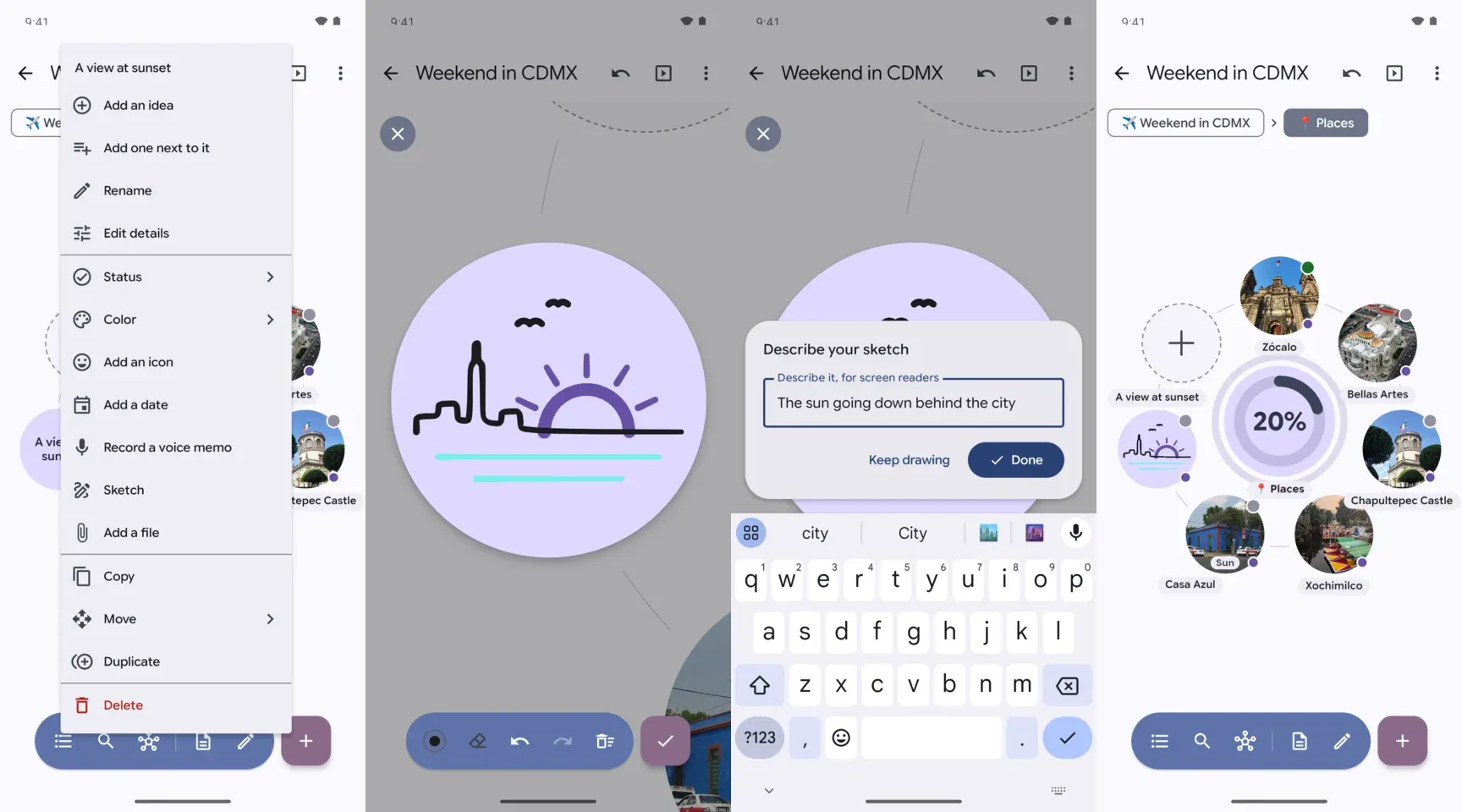
Sketching on a planet, from the long press to the sketch in its orbit.
As you tap Done, Orbit asks what the sketch shows, for screen readers, web pages and prints, as for any picture. Then the planet shrinks back into its place with the sketch as its picture, and one Undo takes it all back. An idea whose picture is a sketch offers Keep sketching instead, to draw on, erase or clear it, and a picture of another kind is replaced only after Orbit asks. Each sketch is a small picture of its own in the map’s folder, so it goes wherever pictures go, and earlier versions of Orbit show it as any picture.
📎 Files On Ideas
An idea can hold files of any kind now: a PDF, a spreadsheet, a ticket, a document. Add them with Add files in the idea’s editor, several at once, or Add a file in its long-press menu. You can also let files go on an idea, dragged from another app, or share them to Orbit from another app with Attach to an Orbit idea. Each one is copied into the map, with a way to stop it while it’s copied, and they join their idea together, with one Undo. The planet wears a small paperclip, with how many from two on.
The idea’s details list them after its note, each with its kind’s icon, its name, and its kind and size (“PDF · 28 kB”). Tap one to open it in an app that can, with a copy, never the map’s own file. Orbit can’t take out what a PDF or a document may say beyond what it shows, such as who made it, when and where, so it asks first (“Open “Boarding pass.pdf” in another app?”), and a copy from a private map is deleted when private maps lock.
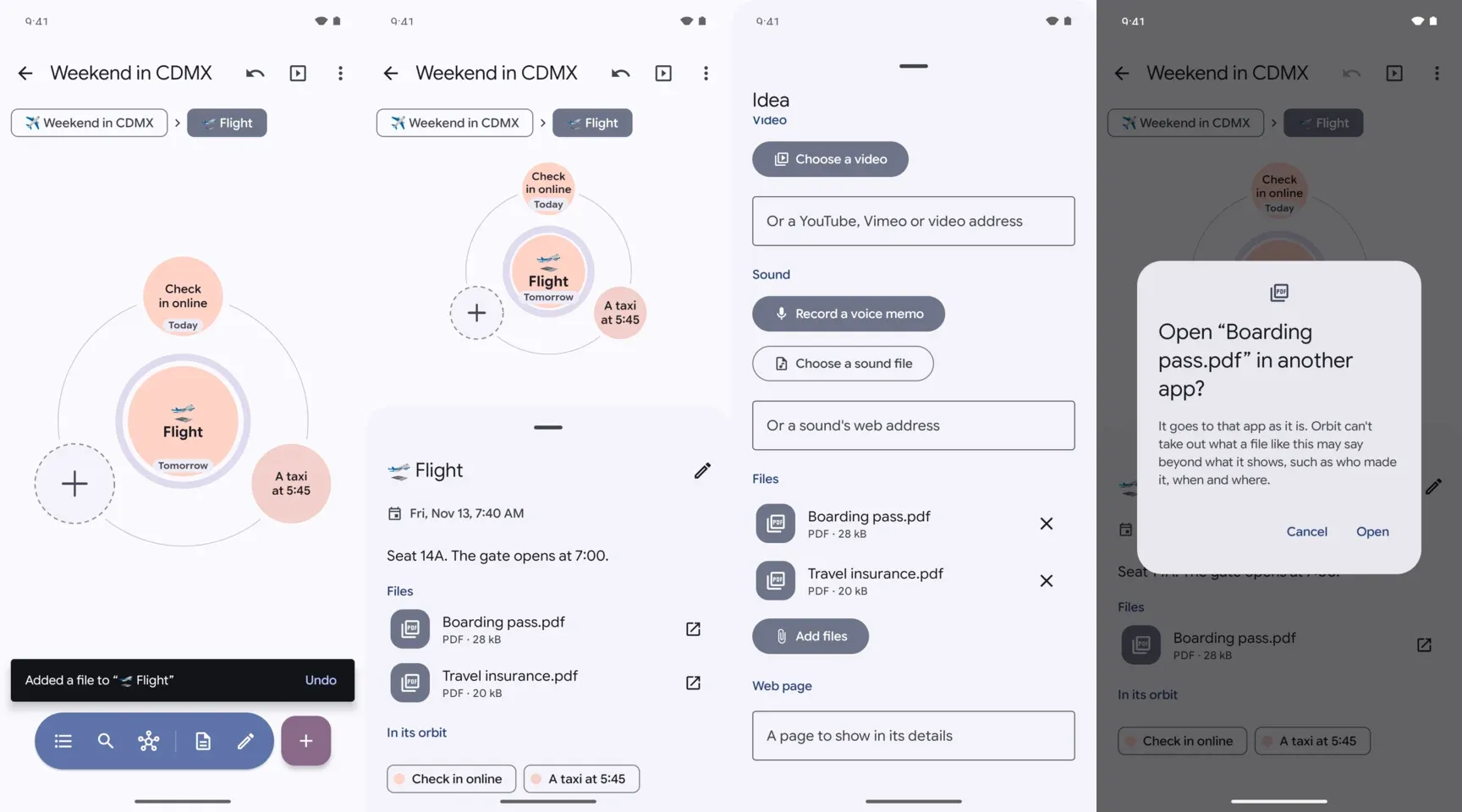
Files go with the map: in its zip, sent to another device, in Export all, backups and the folder you keep maps in. Every way a map goes to other people names them in its line (“2 files stay on this device: Orbit can’t take out what may be hidden in them”) and asks once whether they go as they are. A web page lists them by name, kind and size without carrying them, PDFs and prints name them, and browsers you present to never get them. A file can be up to 250 MB.
🗃️ Bigger Maps
A map holds up to 1 GB of pictures, videos, sounds and files now, and a video, a sound or a file can be up to 250 MB, where v0.4.0 kept 90 MB a map and 50 MB a file. A big map exports as a web page or a zip, and opens on a computer, a piece at a time, without the phone running out of memory, and a map sent from a device nearby opens as it arrives, up to a gigabyte.
A video over about 50 MB, chosen in the editor or let go on the map, comes with an offer: “Make this video smaller? It’s 180 MB. Made smaller on this device, at 1080p, it comes to about 62 MB: quicker to send and back up, and it leaves the map more room.” Make it smaller says how far along it is, with Stop, and once it’s done, what it came to (“Made the video smaller: 61.4 MB instead of 180 MB”). It’s offered when the phone has a video encoder in its hardware, as phones that record video do, and only when it comes out well under what it was.
🇧🇷 Brazilian Portuguese
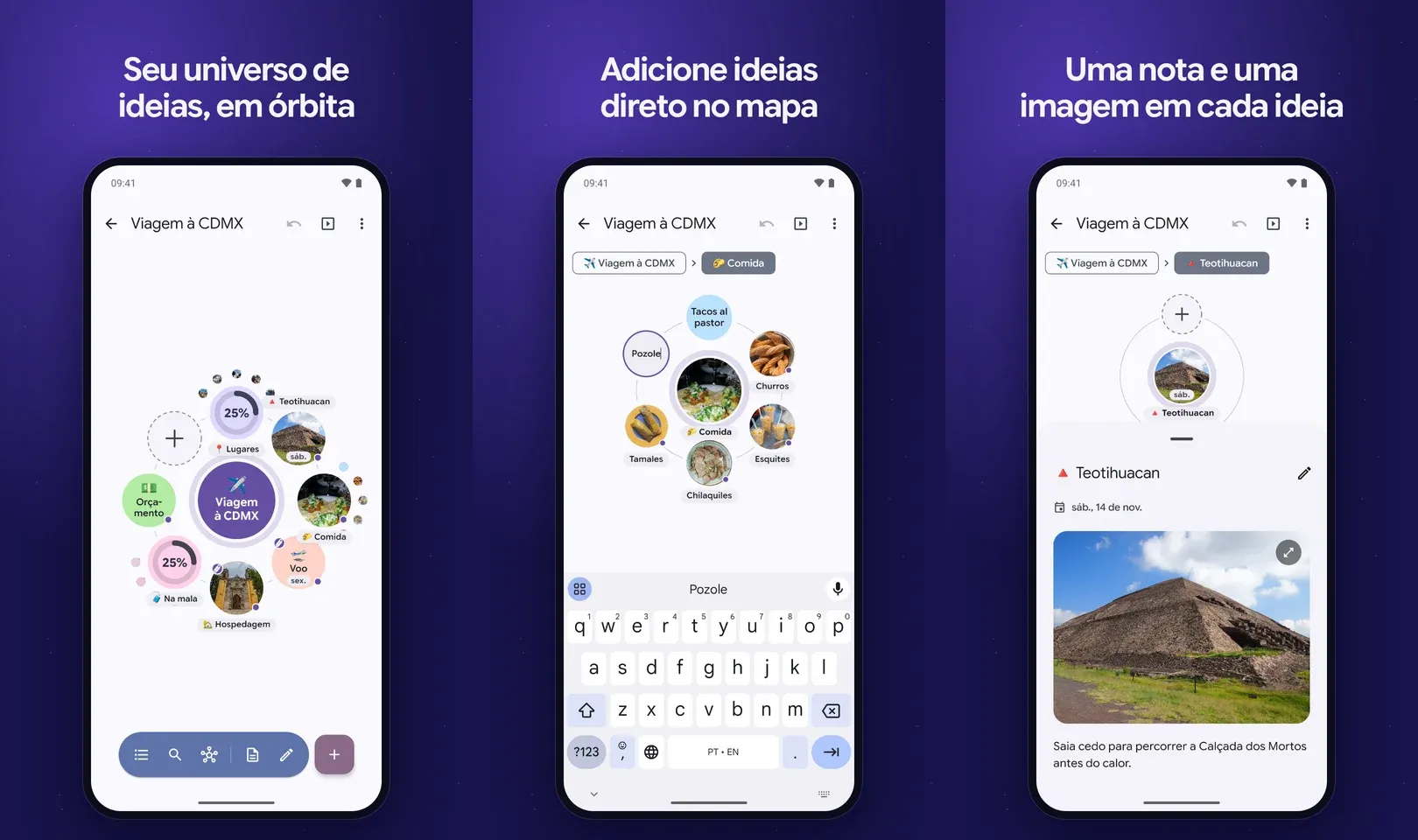
Orbit speaks Portuguese now, as people speak it in Brazil: every screen, the map’s own controls and what TalkBack hears on it, the pages browsers and TVs show, the welcome map, the templates, the privacy policy and the emoji names the icon search finds. It follows the phone’s language, or the one you pick in Settings on Android 13 and later, and a phone in another Portuguese, as in Portugal, gets Brazil’s. Long names break where Portuguese breaks its words.
⚡ Improvements#
- Details at a glance: an idea’s kind, status, priority, date and tags come first in its details, as words after their emoji, dot or icon, and TalkBack hears them as words (“Status: Done”).
- Tablets held upright keep your maps beside the open one, as they do on their side, when there’s room for both.
- Keyboards: the keyboard shortcuts work with a sheet or a dialog open too.
- A map that can’t load says so in its place, and that the map is safe, with Load it again, instead of spinning.
- Videos in other apps: Open in another app hands a video to the phone’s video app as a copy without where and when it was recorded and on what. The map’s own file stays in Orbit.
- YAML maps share and export as the YAML they are, as well as the markdown Orbit writes of them.
- Private maps: keyboards are asked not to learn what you type into a private map, so its words don’t come back as suggestions elsewhere, and a widget shows a map’s lock the moment it’s made private.
- Study: Home’s count of cards due moves on at midnight, and as the phone’s date, time or time zone changes, and a card removed on another device while you study leaves the session at once.
- Voice memos: listening back to a take pauses for a call or another app’s sound, and when headphones come out, and a take outlasts a change of language or font size.
- Presenting to browsers: a device that types five wrong PINs waits before it can try again, longer each time, and after twenty wrong PINs from every device together, new devices wait too.
🐛 Bug Fixes#
A review of the whole app brought more than a hundred fixes. These are the ones you’re most likely to notice:
- Editing a map’s text by hand: what you type there is never saved over a change the map had meanwhile, on the map beside the editor or from another device: it goes into the map’s history instead, with a message.
- Folder sync: a file that changed since the folder was listed is never written over or deleted, as Orbit looks at it again right before, and a picture the folder’s app renames keeps its map pointing at it.
- The trash: deleting for good says a map went only once it has. One whose files don’t all delete stays in the trash, and the trash says it couldn’t delete it.
- Pasting ideas from another map whose pictures can’t come, past the map’s room or with no room left on the phone, pastes nothing, and a message says why.
- Pictures leaving your phone: HEIF and AVIF pictures leave without the video a motion photo keeps inside them, and with their location and other details written over, as other pictures do.
📦 Misc#
- Built on Orbit v0.5.0, the library that draws the maps.
- The privacy policy says reminders are notifications Orbit posts on your phone itself, so nothing leaves your phone for them, and that files on ideas go to other people as they are only if you choose.
How To Update#
- From the website or GitHub: Orbit tells you about the new version within a day. Install it over
v0.4.0; your maps stay. It needs Android 10 or later. - Google Play: Orbit
v0.5.0is on Google Play, and Play keeps it up to date. F-Droid and AppGallery are coming soon. - Sending maps:
v0.5.0sends maps tov0.4.0andv0.3.0, and before a map goes, the dialog with the code says what won’t open on the older one: files of kinds it doesn’t keep stay on this phone.v0.4.0and earlier take maps of up to 64 MB, so for a bigger one, Orbit says to update the other device first. Orbitv0.2.0and earlier can’t send maps tov0.5.0: each says which device to update. - Several devices:
v0.4.0keeps an idea’s dates and files when it changes a map, but shows neither and doesn’t remind, and a sketch shows there as any picture. In a shared folder it keeps 50 MB a file and 90 MB a map, and Settings here names the maps it keeps only part of.
To check the download, its SHA-256 is 7daa2557d073011d898b568d7fc4e299c80c08eff8d02e43dfedc3193cdad98e, and it’s signed with the certificate b4fd505f255c406cd205a6c403898e2069968339ad40269d5c22be79d561a107. Both are on the release on GitHub too, with orbit-0.5.0-fdroid.apk, the same app without the update check.