Orbit v0.5.0
npm: @restless-dreams/[email protected] · Website: orbit.hyuchia.com · Docs: orbit.hyuchia.com/docs
npm install @restless-dreams/[email protected]v0.5.0 gives ideas dates and files, shows the tables and checklists in their notes, and brings a node up close for a page to lay something of its own over it, such as a canvas to sketch on. Orbit speaks Brazilian Portuguese now, and breaks Portuguese words where Portuguese breaks them. It takes nothing away, and the format keeps its version: maps written with v0.4.0 read the same, and v0.4.0 keeps the dates and files v0.5.0 writes. Here’s everything that changed and how to use it.
💜 Support Orbit
Orbit is free and open source, with no ads and nothing locked away. If it’s useful to you, you can help it grow: your support pays for the time that goes into new features and fixes.
- ❤️ GitHub Sponsors
- 💸 Wise
- 🧡 Patreon
- ☕ Ko-fi
📰 Release Change Log
🌟 New Features
📅 Dates On Ideas
An idea can have a date now: a day, or a day and a time of day. It’s the new due attribute, in local time with no time zone, so 9:30 is half past nine wherever the map is read, as a date in a paper diary is:
# Trip
## Book the flights <!-- orbit due: 2026-11-20 -->
## Hotel deposit <!-- orbit due: 2026-11-20 09:30 -->
- [x] Passport photos <!-- orbit due: 2026-11-16 -->
Its planet shows the date small, in a chip at its bottom: “Today”, or its time when it’s today, “Tomorrow”, “Fri”, “Nov 20”, with the year when it’s another year’s, in the map’s language. Once its day is over, or its time has come, the chip takes the theme’s attention color, --orbit-overdue, each theme’s red at 4.5:1 or more, unless the idea is done: a done idea is never overdue. Names keep clear of the dates, their own and their neighbors’, and the map shows its dates again as a day starts and when the page comes back into view. The detail sheet has a chip with a calendar, which says “Overdue” in words once it is, the outline shows each date after its idea, and screen readers hear it in full with the idea’s name, and whether it’s overdue.
From code, addNode and updateNode take a date as a file writes it, and parseDue reads one, for apps that keep their own calendar:
import { createOrbitMap, parseDue } from '@restless-dreams/orbit';

const map = createOrbitMap(element, markdown, { editable: true });
map.updateNode('flight', { due: '2026-11-13 07:40' });
map.updateNode('flight', { due: undefined }); // takes the date off

parseDue('2026-11-13 07:40'); // { year: 2026, month: 11, day: 13, hours: 7, minutes: 40 }
parseDue('2026-02-30');       // null: that day doesn't exist
Orbit writes a date quoted, due: "2026-11-20 09:30", so YAML readers take it as text, and reads it unquoted too, with a T before the time, as programs write it. A date that doesn’t exist, such as February 30th, is kept as written, with an invalid-attributes note, and not shown. Map tools read each date with its weekday, and update_node sets one; prints list them with their year. See Dates.
📎 Files On Ideas
An idea can hold files: a PDF, a spreadsheet, a ticket, any file. They’re the new files attribute, a list, each file its address, or its address with what Orbit shows of it without opening it:
# Trip
## Tickets
<!-- orbit
files:
  - src: media/boarding-pass.pdf
    name: Boarding pass.pdf
    type: application/pdf
    size: 48213
  - src: media/hotel.docx
    name: "Hotel: booking, final.docx"
-->
- Visa <!-- orbit files: [media/visa.pdf] -->
Its planet wears a paperclip at its upper left, with how many from two on, and its description says so (“has 2 files”). In focus, it offers “Show files”, which opens the detail sheet at them: a row for each, with its kind’s icon, its name, and its kind and size under it (“PDF · 48 kB”), in the map’s language.
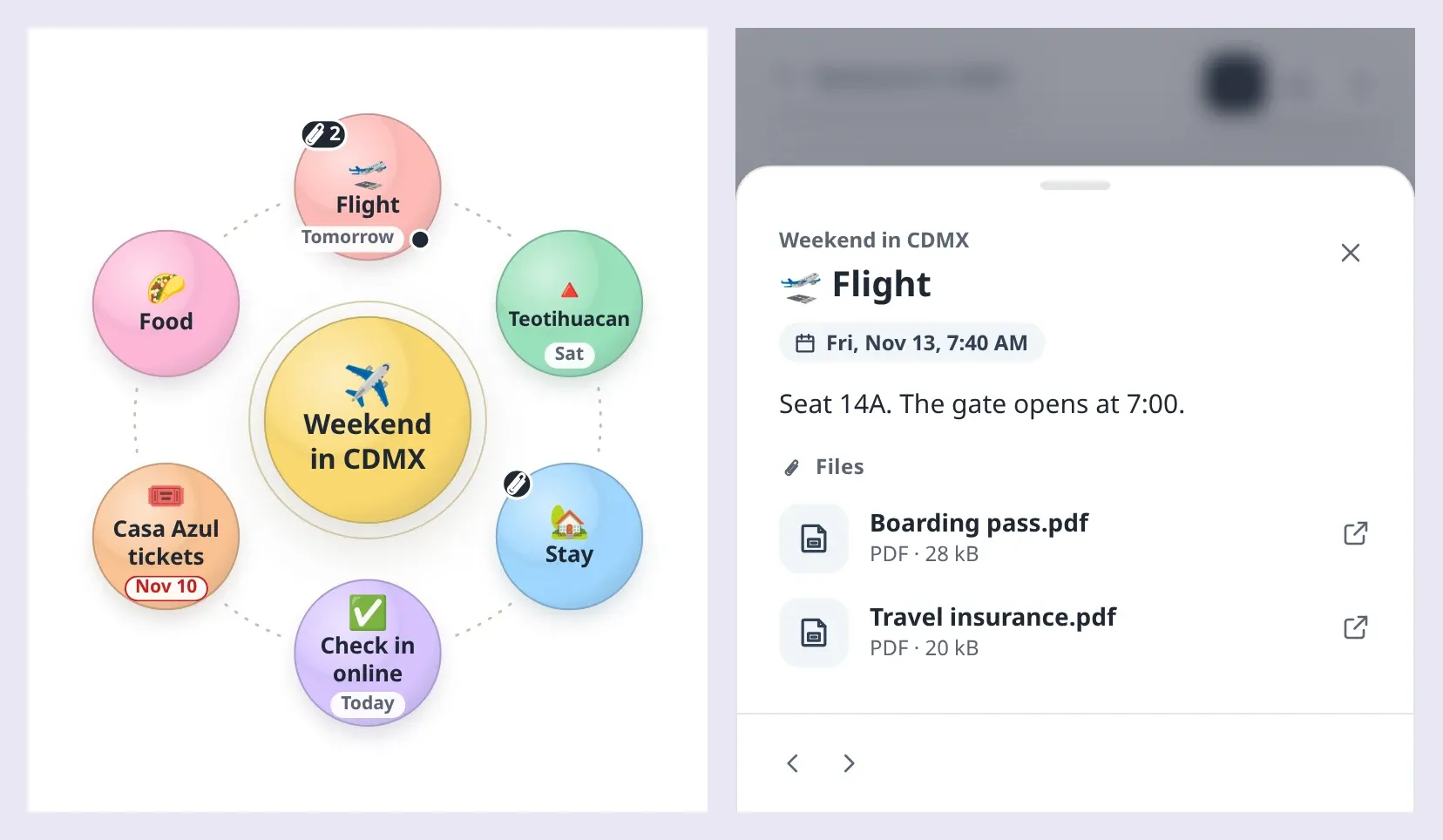
A file pressed there opens its address in a new tab, resolved against baseUrl, and only when it’s on the web or relative to the map. An app that keeps the files itself, as one on a phone does, takes the press and opens the file its own way:
map.on('file-open', (event) => {
  event.preventDefault();
  openInAnotherApp(event.node.id, event.file.src, event.file.type);
});
onFileOpen returning false does the same, and the React wrapper takes it as a prop. Where the files can’t be opened from, openFiles: false lists them without opening them, and the sheet says they stayed with the map: pages made with exportWebPage do so. Prints and PDFs name each file, its kind and its size, map tools read them, and addNode and updateNode take files as a file writes them, keeping the fields Orbit doesn’t read. See Files.
📝 Tables And Checklists In Notes
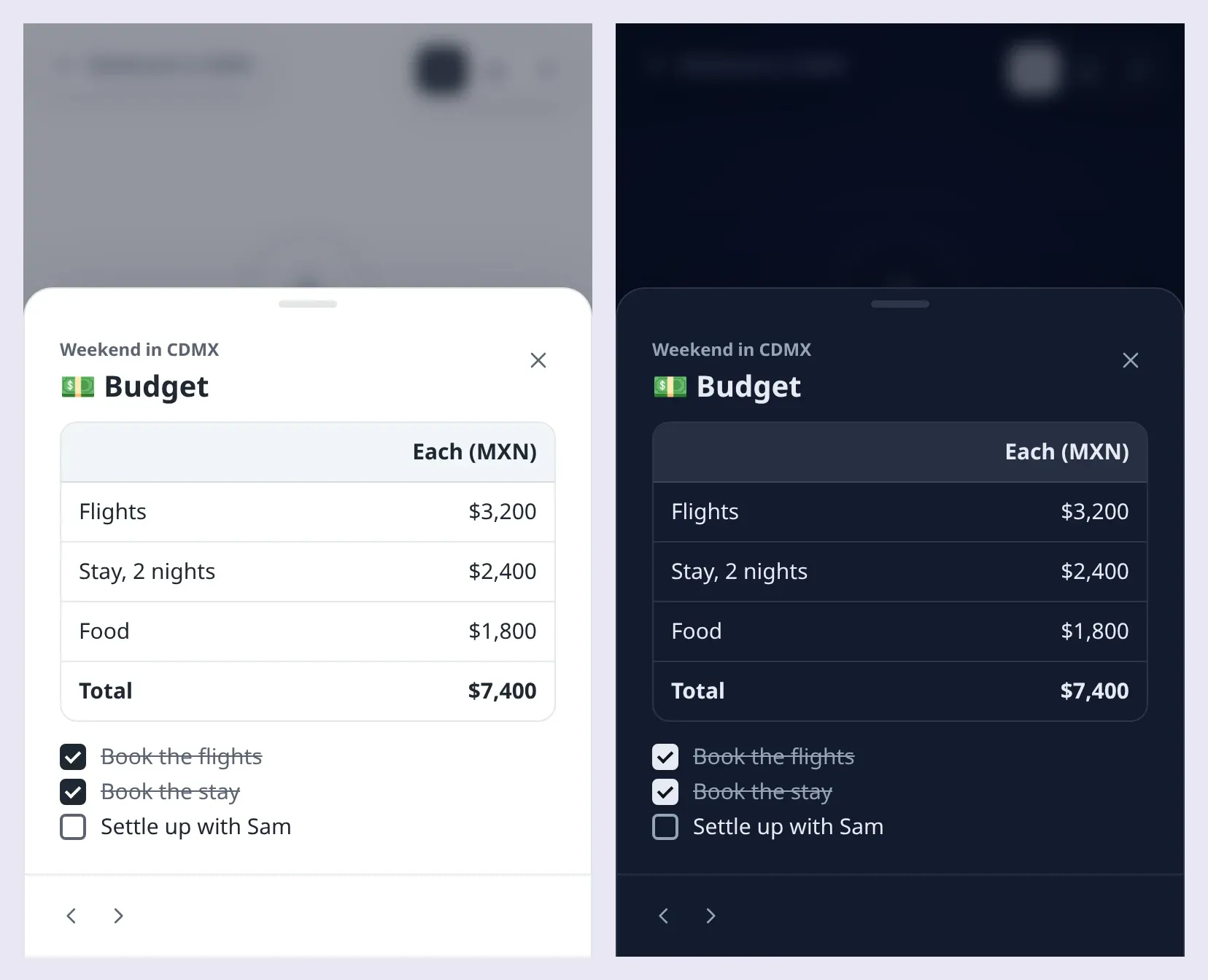
A note’s GitHub tables show as tables now, and the [ ] and [x] items of its quoted lists as checkboxes, wherever Orbit draws a note: the detail sheet, prints, and a web page’s captions. A list in a note is quoted with >, as before, so its items stay note text rather than ideas:
# Trip
## Budget
| | Each |
| :--- | ---: |
| Flights | $3,200 |
| Stay, 2 nights | $2,400 |
| **Total** | **$5,600** |

> - [x] Book the flights
> - [ ] Settle up with Sam
A table sits in a box that scrolls sideways when it’s wider than the note, its columns aligned as its row of dashes says, with inline formatting in its cells. Checkboxes are real ones, named by their item’s text, at any depth. On an editable map, checking one in the detail sheet changes that box in the note and fires edit, like any edit, and saving it changes just that box’s line of the file. On other maps the boxes show but don’t change.
For a page that shows notes itself, renderNoteMarkdown takes onCheck, and setNoteCheckbox gives the note with one box changed and every other character as it was:
import { findNodeById, renderNoteMarkdown, setNoteCheckbox } from '@restless-dreams/orbit';

caption.replaceChildren(renderNoteMarkdown(note, {
  onCheck: ({ line, checked }) => {
    const latest = findNodeById(map.getDocument().root, id)?.note ?? '';
    const changed = setNoteCheckbox(latest, line, checked); // null when the note changed since it showed

    if (changed !== null) {
      map.updateNode(id, { note: changed });
    }
  },
}));
Tables and checklists are note text to every version of Orbit: earlier ones show them as written, and keep them when they save. See Notes and Notes in your own UI.
🔍 Bringing A Node Up Close
spotlight(id, options?) brings a node up close, for something of your own to lie over it: a canvas to draw on, say, or a picture to frame. The camera flies until the node fills most of the room, the rest of the map dims under the sheet’s backdrop, and the node’s name, icon and badges step aside, leaving its color and its picture. endSpotlight() flies the camera back where it was.
const map = createOrbitMap(element, markdown, { editable: true });

map.on('spotlight', ({ phase, x, y, radius }) => {
  if (phase === 'rest') {
    canvas.style.cssText = `left: ${x - radius}px; top: ${y - radius}px; width: ${radius * 2}px; height: ${radius * 2}px`;
    canvas.hidden = false;
  }
});

map.spotlight('summit', { share: 0.8, insets: { bottom: 96 } }); // 80% of the room above a 96 px toolbar
// …and when the drawing is done:
canvas.hidden = true;
map.updateNode('summit', { image: { src: drawing } });
map.endSpotlight();
The spotlight event says where the node’s circle is on screen: on each frame of the flight (move), once it lands (rest), and once the camera is back (end). While the node is up close the map takes no gestures, keys or presses, the orbit doesn’t drift, and the camera holds the node where it landed: an edit to it, a new picture included, keeps its circle where it is, and a map that changes size fits it again. getNodeCircle(id) says where any node is drawn. <orbit-map> and the React wrapper’s ref have all three, and the React wrapper takes onSpotlight. Orbit for Android’s new sketching is built on it. See Bringing a node up close.
🇧🇷 Brazilian Portuguese
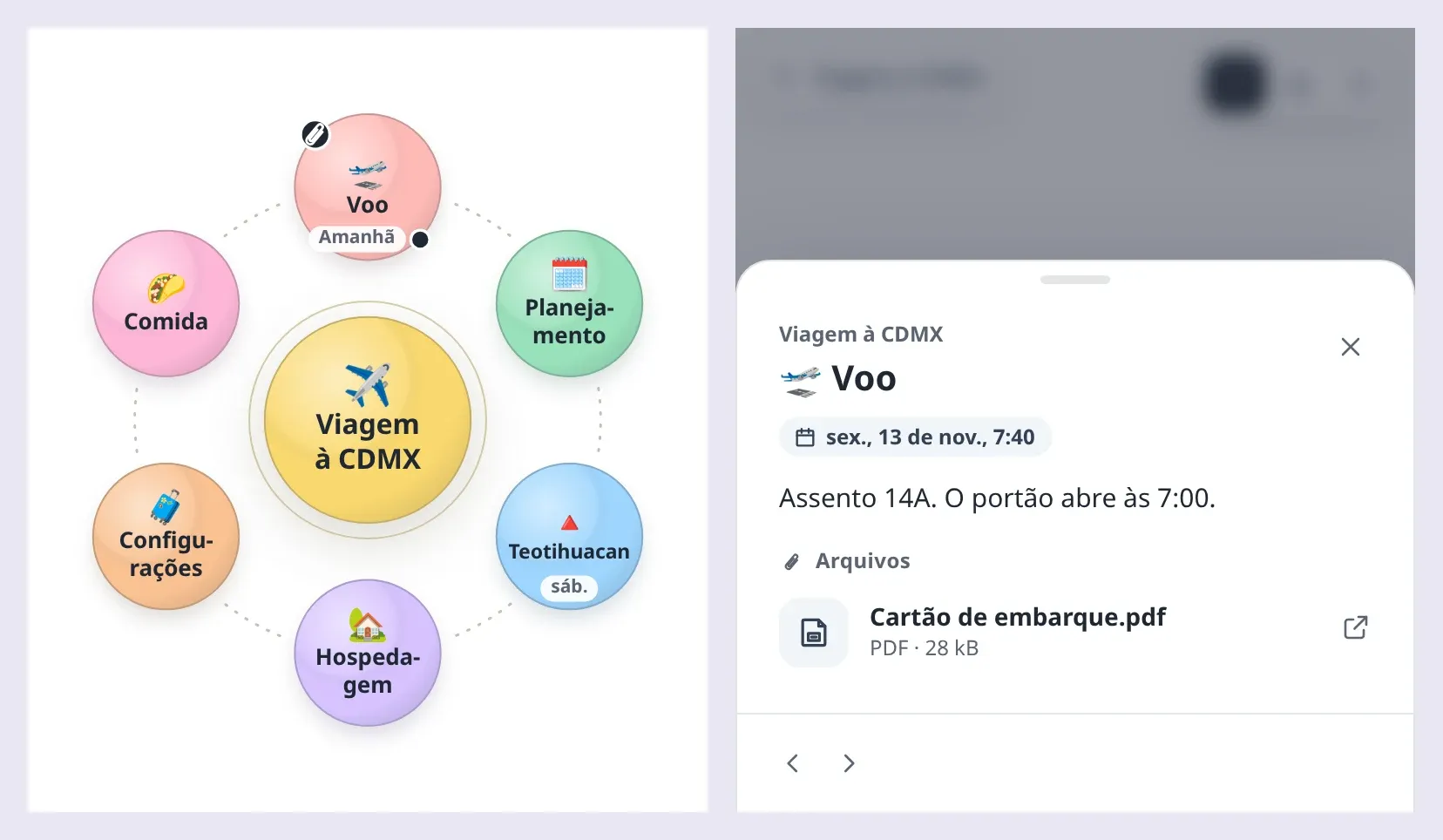
Orbit’s own words come built in in Brazilian Portuguese too, beside English and Spanish: the controls, the detail sheet, the media viewer, the outline and everything screen readers hear. Pages in pt-BR and pt speak it, and so do pages in pt-PT, with Portugal’s numbers, until they register Portugal’s own words, which then leave Brazil’s as they are:
createOrbitMap(element, markdown, { language: 'pt-BR' }); // or <html lang="pt-BR">, or <orbit-map lang="pt-BR">
registerLanguage('pt-PT', { overview: 'Vista geral' });  // Portugal's word there, Brazil's everywhere else
The words agree with “ideia” and put the idea’s name after them, so an announcement reads right whatever the name (“Ideia excluída: Museus”). Dates are written Brazil’s way (“sex., 13 de nov.”, “Amanhã”), and a long word breaks where Portuguese breaks it, from hyph-utf8’s Portuguese patterns, the ones TeX uses: “No-ti-fi-ca-ções”, “Pla-ne-ja-mento”. As Portuguese typesetting has it, a break leaves at least two letters before the hyphen and three after it, in a map in any Portuguese.
Languages lists every word in the three languages.
⚡ Improvements
- Badges that make room: a sound’s badge beside a video goes to the upper left on a node with a date, out of its way, and the paperclip moves along the rim beside a sound’s badge. Exports draw them there too.
- Colors you can read: the paperclip and its count are drawn in the badge’s rim color, which every theme sets 4.5:1 or more apart from the marker’s, and the dates’ chips are drawn in the controls’ colors, as a “+N” is.
🐛 Bug Fixes
- Notes: a note line indented four spaces that starts with
#no longer sends the note’s renderer into a loop that never ends, and nested lists in notes no longer leave a gap before the next item. - Type versions: a type’s version too long for a number to hold exactly, such as
goal@99999999999999999999, is kept as written. Writing the idea’s attributes again used to write it with other digits, or a version of 400 digits asgoal@Infinity, which reads back as another type. Its node is drawn as a plain idea, as one written for a newer version of its type is, andaddNodeandupdateNoderefuse such a version rather than write it with other digits.
📦 Misc
- The format keeps its version: dates and files are attributes, which versions from before them keep as custom attributes and write back as they were, through their own edits too, renamed, checked off, colored and moved, and in their YAML. A test has Orbit
0.4.0, from npm, write maps with dates and files, and checks that every one comes out of them as it went in. - Hyphenation patterns: Orbit now includes hyph-utf8’s Portuguese patterns, version 1.4, under the BSD 3-clause license, beside its American English and Spanish ones. The notices of all three are now kept in the code people install, as their licenses ask.
- Chromium 99, tested: the check in Chromium 99, the oldest WebView Orbit for Android draws maps in, now brings an idea up close and lets it go again, as the app does to sketch on it.
- Docs: the format reference, the guide, editing, map tools, languages, theming and accessibility cover dates, files, tables, checklists and bringing a node up close, and so do the README and the API reference.
How To Upgrade
If you’re on v0.4.x
npm install @restless-dreams/[email protected]Nothing is renamed or taken away, so there’s nothing to change. A few things may change what you see:
- Notes with tables or quoted
[ ]and[x]items show them as tables and checkboxes, wherev0.4.0showed them as written. On aneditablemap, checking a box is an edit, and firesedit. - A
dueorfilesattribute a page used for its own purposes is Orbit’s now: a valid one shows on the map, and one Orbit can’t read is kept as written, with aninvalid-attributesnote. - Pages in Portuguese (
pt,pt-BRorpt-PT) get Orbit’s words in Brazilian Portuguese where they got English, and long words in a Portuguese map break where Portuguese breaks them.
If several versions read the same maps: v0.4.0 keeps the dates and files v0.5.0 writes, and writes them back as they were, but shows neither, and it shows tables and checklists as written. Maps v0.4.0 wrote open in v0.5.0 as they did.
If you’re on v0.2.x
Upgrade as Orbit v0.4.0’s notes say first: they cover the names settled for 1.0, which keep working until then.
Orbit for Android v0.5.0 uses this release, and it’s on Google Play and GitHub now.